SorrelSites vs Raklet
SorrelSites vs Raklet
Both can run your membership. Only one keeps running when your board does, moving you in for free and updating your website for you. Raklet is affordable and broad, with a free tier for tiny groups — but it adds a fee on top of your payment processor, and the move and the website edits are on you.
Modern, international membership & community system
Is SorrelSites a better fit than Raklet for a small organization?
SorrelSites is the better fit for a small organization that would rather not run its own migration or its own website edits, and Raklet is the better fit if the lowest possible monthly cost decides it. Raklet costs less to start — free for up to 100 contacts, then $49 a month at its entry tier — against SorrelSites' $99 a month for up to 100 active members. The difference shows up on your dues: Raklet adds a percentage fee on top of your payment processor, about 4%, 2% or 1% by plan, while SorrelSites takes no cut at all, because dues and event payments land in your organization's own Stripe account. SorrelSites is month to month with no setup fee, and it counts only active memberships, so captured contacts and lapsed members do not push you into a bigger plan. SorrelSites is also the only side of this comparison that runs the board and keeps the event plan — Sprout drafts the minutes with motions and votes on the record, and turns last year's planning spreadsheet into a live checklist — while Raklet leaves the board's paperwork and the event run-up in documents, email, and spreadsheets.
Who the AI actually serves
- SorrelSites
- Sprout, SorrelSites' AI, does the org's real work — it drafts board minutes, event pages, and website updates for you to approve, and it welcomes people curious about joining in your org's voice. Behind the scenes it also moves you in and reimagines your website — it asks four short questions about what the site should do and builds the new design from your answers; afterward you change your site just by describing it, preview first, then publish.
- Raklet
- Raklet now offers its own AI — an onboarding import and a member-Q&A chatbot — but it's pointed at answering members, not welcoming people curious about joining, moving you in, or turning your old site into new designs you choose between.
Running the board
- SorrelSites
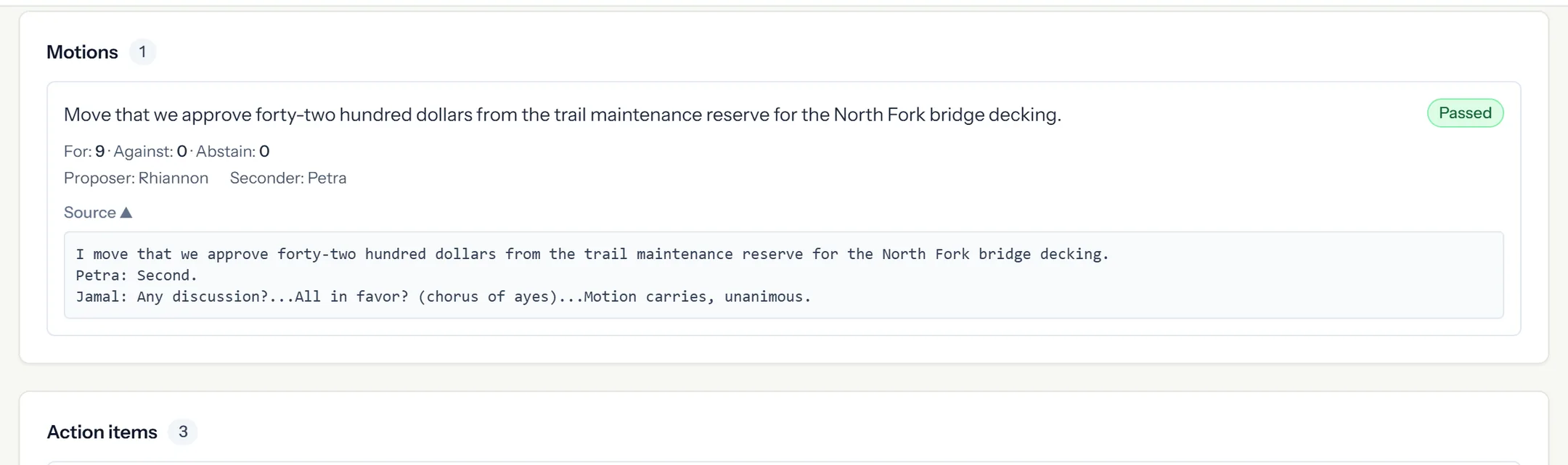
- Your board runs here too. Sprout drafts the minutes — motions, votes, and action items on the record — from your notes, a transcript, or the recap email you forward to your organization's own Sprout address. Approved minutes lock, follow-ups chase their owners, and every new director gets a briefing built from the last year of minutes.
- Raklet
- Nothing for the board — minutes, motions, and follow-ups live in Word, email, and shared drives.
Planning & running events
- SorrelSites
- Paste last year's planning spreadsheet and Sprout turns it into a live checklist with owners and due dates. On the day, check people in by QR from your phone — per session, on a conference day — and push announcements, run live polls, and take floor questions from one screen, with no second app. The thank-you sends itself afterward, and the plan stays with your organization, not on a volunteer's laptop.
- Raklet
- Event registration is there, though recurring events are limited — and there is no planning checklist and nothing live in the room: no announcements, live polls, or floor Q&A.
Moving in
- SorrelSites
- Sprout reimagines your website and maps your member list, then accounts for every page — kept, merged, left behind, or needs a photo. Free, for you to approve. And if something didn't come across the way you wanted, a real person here fixes it with you.
- Raklet
- You bring your data over yourself, and a branded mobile app you build there won't come with you.
Changing your website
- SorrelSites
- Type the change you want, see a preview, and publish when you're ready.
- Raklet
- Going beyond the basics leans on design know-how, and the standalone form builder isn't fully there yet.
Fees on your dues
- SorrelSites
- No fees on your dues — you pay your processor, nothing extra to us.
- Raklet
- A percentage fee on top of your payment processor (about 4% / 2% / 1% by plan).
Getting help
- SorrelSites
- The same people help every organization on a paid plan — and they get to know how yours runs instead of answering tickets cold. Sprout covers the questions that don't need a person, day or night.
- Raklet
- Support can lag a day for U.S. time zones.
What it costs
- SorrelSites
- $99 a month for up to 100 active members, $199 for up to 300, $399 for up to 750, $699 for up to 2,000.
- Raklet
- Free for 100 contacts, then $49 / $99 / $399 a month.
Both SorrelSites and Raklet ship AI, and they point it at different jobs: Raklet's is an onboarding import plus a 24/7 member-Q&A chatbot aimed at answering existing members, while SorrelSites' Sprout drafts board minutes, event pages and website updates for a person to approve and welcomes people curious about joining.
SorrelSites runs the board itself — Sprout drafts minutes with motions, votes and action items on the record, approved minutes lock, and every new director gets a briefing built from the last year of minutes — while Raklet has nothing for the board, leaving minutes, motions and follow-ups in Word, email and shared drives.
SorrelSites turns last year's event-planning spreadsheet into a live checklist with owners and due dates and runs the event day from one screen — QR check-in, announcements, live polls and floor Q&A — while Raklet covers registration with limited recurring events, no planning checklist and nothing live in the room.
SorrelSites reimagines your website and maps your member list for you to approve at no charge, accounting for every page at the end — kept, merged, left behind, or needs a photo — with a real person at SorrelSites to fix anything that didn't come across the way you wanted, whereas moving to Raklet means bringing your data over yourself and Raklet lists onboarding as a paid add-on from about $300. A branded mobile app built in Raklet does not come with you when you move to SorrelSites.
SorrelSites lets you type the change you want, see a preview and publish when you're ready, while in Raklet going beyond the basics leans on design know-how and its standalone form builder isn't fully there yet.
Raklet charges a percentage fee on top of your payment processor — about 4%, 2% or 1% depending on the plan — while SorrelSites takes no cut of your dues, because dues and event payments land in your organization's own Stripe account and you pay your processor directly.
SorrelSites gives every organization the same people on every paid plan, including Starter, and those people get to know how the organization runs; Raklet's support can lag a day for U.S. time zones.
Raklet is free for up to 100 contacts and then $49, $99 or $399 a month, while SorrelSites is $99 a month for up to 100 active members, $199 for up to 300 and $399 for up to 750, billed month to month with no setup fee. The two prices count different things: SorrelSites' plan size counts only active memberships, so captured contacts and lapsed members do not push you into a bigger plan, while Raklet's free tier is measured in contacts and capped at 100.
A closer look
From the meeting to the record.
Sprout drafts your minutes for you to review. Here is how a motion and its vote appear in the record.
When is Raklet the better choice?
Sometimes it is, and we'd rather you land in the right place than the wrong one. Raklet can be the better choice if:
- You're an international or community-first group that wants a branded mobile app and SMS, plus a free tier for a very small contact list.
- Lowest possible cost matters more than having the move and your website handled for you.
Looking at other options too? See our pricing or the move-in story.
How the move from Raklet works
Moving in is included — no moving fee, no setup fee — and Sprout does the carrying, so you're checking the work, not re-typing it.
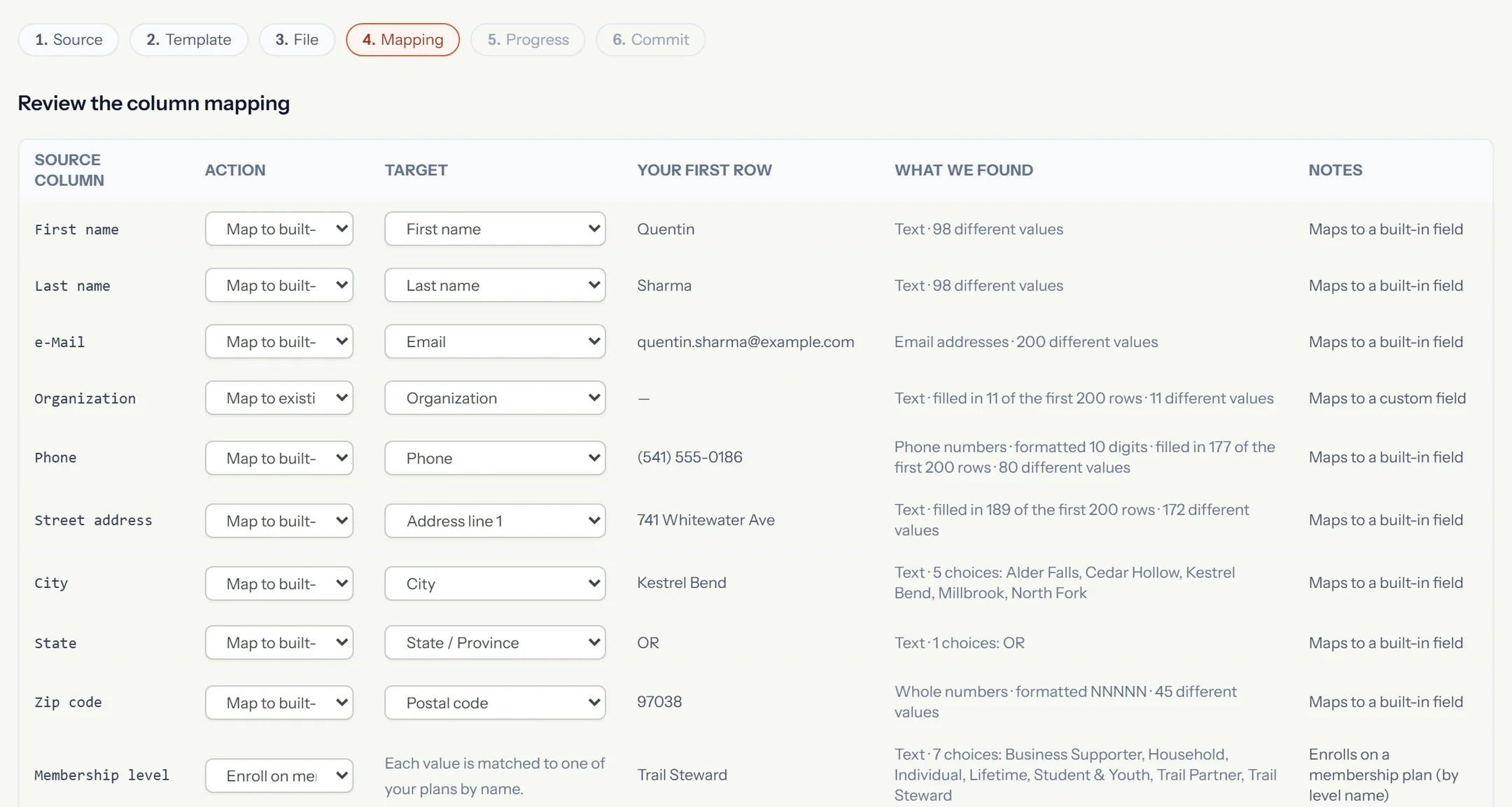
Export your contacts from Raklet
In Raklet, open Contacts, then use More → Export — Raklet emails you the file. It's all yours to take with you, and that's what Sprout brings across for you.
Start your free trial
Fourteen days, no card. Confirm your email and your site is live right away at yourname.sorrelsites.com — nothing to install.
Let Sprout do the moving
Hand Sprout your member file and point it at your old site. It lists every page it finds so you tick what comes with you, brings that across, and reimagines it — then shows you a preview. You're checking the work, not re-typing it.
Review and go live
Look it over and change anything you like. If something didn't come across the way you wanted, say so — a real person here will fix it with you. Publish when you're happy, and add your own web address whenever you're ready.
And you're not doing it alone.
If something didn't come across the way you wanted, tell us while you're settling in and a real person here will get in and fix it with you — no charge, no ticket to file. Email support@joinsorrel.com.
Leaving something else, or not sure yet? The move-in story covers what carries over whoever you're coming from.
SorrelSites and Raklet: common questions
How do we get our data out of Raklet?
See it next to Raklet, using the work you do
Bring your members, your dues and the tasks that keep coming back. We'll walk through the work together and give you an honest answer about fit, including when staying put is the right call.